
How to play video in the background on iPhone
Lock an iPhone while a video is playing and the sound stops. That is deliberate: iOS only lets an app keep audio running with the screen off if the app has asked the system for a background audio session. Safari can be nudged into it through the Control Centre, Picture-in-Picture handles a different problem entirely, and a downloaded file played in an app that holds a proper audio session just keeps going.
Why iOS stops your video when the screen turns off
Every app that plays sound on iOS registers an audio session with the system, and that session has a category. Most video is played under a category that yields as soon as the device locks. Music apps, podcast players and navigation apps use a different one, plus a background mode entitlement that tells iOS the app is expected to keep making noise while nothing is on screen.
So the question is never whether your iPhone can play video with the screen off. It always can. The question is whether the app in front of you asked for permission to do it.
The short version: the Control Centre trick works in Safari and costs nothing. Picture-in-Picture does not survive the lock screen. Downloading the file and playing it in an app with background audio is the only approach that works every time, on any site.
Method 1: Safari, desktop mode and the Control Centre
This is the free workaround most guides describe, and it does work.
- Open the site in Safari rather than its app.
- Tap the aA menu in the address bar and choose Request Desktop Website.
- Start the video, then lock the phone with the side button. The audio will cut out.
- Swipe down for the Control Centre or wake the lock screen, and press play on the media widget. The audio resumes and keeps going.
Two things to know before you rely on it. The extra step is not optional, so you are pressing play twice for every video. And the desktop-mode request sometimes reverts on navigation, which drops you back to the mobile layout with the trick no longer available.
Method 2: Picture-in-Picture, and what it does not do
Picture-in-Picture floats the video in a small window over other apps. Turn it on in Settings › General › Picture in Picture, then swipe up while a supported video is playing.
It is genuinely useful for watching something while you answer a message. It is not a background player. Lock the phone and PiP stops with everything else, because it is still a foreground video session with a smaller window. People searching for background playback often land on PiP guides and come away disappointed for exactly this reason.
Our guide on why Picture-in-Picture stops working on iPhone covers the failure cases in detail. In short, PiP depends on the app implementing it. Safari, FaceTime and Apple TV have supported it for years. YouTube opened PiP to free accounts globally in April 2026, though the rollout is staged and music videos stay behind Premium.
Method 3: Download the file and play it locally
Once a video is a file on the device, the browser and the site's rules stop mattering. What decides whether it plays with the screen off is the player.
A player built for offline media declares the background audio capability up front, so iOS keeps the session alive through a lock, an app switch or an incoming notification. You get lock-screen transport controls, the audio shows up on the lock screen with artwork, and AirPlay works from there. No second press of play.
This is also the only method that is indifferent to what the source site does. Streams delivered as HLS segments, which defeat most download shortcuts, become an ordinary local file once assembled. Our companion guide covers how to download video on iPhone and why HLS breaks the simpler approaches, and a separate one explains where downloads go on iPhone once they are saved.
Free iOS downloader and offline player. Background audio with the screen locked, Picture-in-Picture, lock-screen controls and AirPlay. Rated 4.4 out of 5 from 1,330 App Store ratings.

Why the YouTube app will not do this
Background playback on YouTube is a paid feature of YouTube Premium. The app ends its audio session when the screen locks, which is a business decision, not something iOS forces on it. That is why every free workaround you find routes around the app through Safari.
Worth being straight about the trade-off: YouTube's terms of service do not permit downloading its videos, whatever the technical means. Read our note on copyright and terms of service before you decide how to use any of this.
Lock-screen controls and AirPlay
Once an app holds a background audio session, iOS gives it the standard media furniture at no extra effort: play and pause on the lock screen, skip controls, the scrubber, artwork, and AirPlay routing to a speaker or Apple TV. Playback also ducks correctly for Siri and resumes after a phone call.
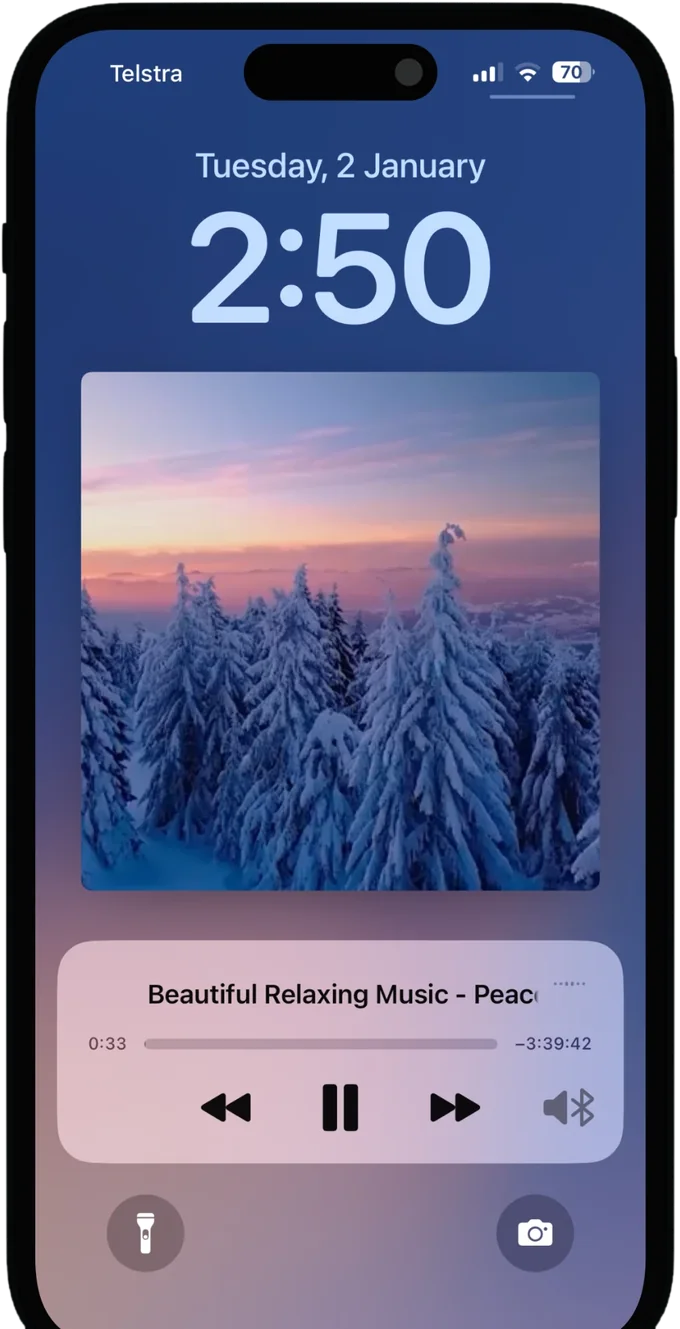
The Safari workaround gets you a subset of this. The media widget appears and the scrubber works, but you are still tied to a browser tab that any navigation can disturb.
Which method to use
Use Safari and the Control Centre if you need this once and do not want to install anything. Use Picture-in-Picture when the screen is staying on and you want to do two things at once. If you listen to long video regularly with the phone in your pocket, download it and play it locally, which is the only option that survives a locked screen without a second press of play.
Questions
Does Picture-in-Picture keep playing when the screen is off?
No. PiP survives leaving the app, but locking the phone stops it like any other video. It solves multitasking, not screen-off playback. For audio that continues past the lock button you need a player that declares the background audio capability.
Why does Safari keep playing audio when the YouTube app does not?
Both are technically capable of it. Safari resumes when you press play in the Control Centre because iOS treats the paused media session as resumable. The YouTube app deliberately ends its audio session on lock unless you have a Premium subscription, which is a product decision rather than an iOS limitation.